Why free gift plugins break your cart, and a gift that can't
Three bugs owners keep reporting, five tests that catch them, and a gift that never goes near the cart.
By the Autora Lab team · Updated November 17, 2026 · 7 min read
Short answer
It's the Saturday after Black Friday, and an email comes in: "Your site said the mug was free, so why did you charge me $32.00?" You open the order, and the mug is there at full price. Your free gift plugin is not working, and Cyber Monday is two days away.
You're not the only one. Store owners have reported the same few cart gift bugs in support forums for years, and most of them start in the same place.
Why is my free gift plugin not working?
Because the gift lives in the cart, and the cart keeps changing until the customer pays.
A cart gift plugin must check its rule after every change to the cart. Shoppers add and remove items, change quantities and try coupons. Their address can change the tax.
Each check is a new chance to get it wrong. Miss one, and the cart shows a gift the shopper didn't earn, or a price on a gift you called free.
There's a second cause. New WooCommerce stores get the Cart and Checkout blocks by default, and they're built differently from the older classic cart. A plugin written for the classic cart may not work the same way in the blocks.
The three bugs owners report
Most reports about cart gifts are about one of three bugs. For example, say Good Ideas Studio runs a cart offer: "Spend $50.00 or more, get a free mug." Here's how each bug looks.
The free gift isn't removed from the cart
A shopper adds two Fern prints at $28.00 each. The cart reaches $56.00, and the mug joins it for free.
Then they take one print out. The cart drops to $28.00, but the mug stays. If they check out, you ship a $32.00 mug with a $28.00 order.
A coupon can do the same. A few dollars off, and the cart is under $50.00 with the mug still in it.
The customer is charged for the free gift
The cart shows the mug at $0.00. Then, somewhere between the cart and the payment, the price comes back. The customer pays $32.00 for a gift you called free.
A sold-out gift is still offered
You run out of mugs on Saturday, but the cart keeps promising one. Either you take orders for a gift you can't ship, or WooCommerce may stop the checkout with a "not in stock" error.
The first means an apology email to every one of those customers. The second means a shopper who leaves.
What does a broken cart gift cost you?
More than the gift itself: you pay with refunds, support time and your customers' trust.
The charged gift hurts most. Baymard Institute, a firm that studies checkout pages, says on a page it updated in 2026 that extra costs are the top reason US shoppers leave a cart without buying.
In its survey, which the page doesn't date or size, 40% of shoppers who left for a reason other than just browsing said extra costs, like shipping, tax or fees, were too high. So treat the 40% as rough.
A "free" gift with a price is exactly that kind of surprise. Some shoppers leave. The ones who pay may ask for a refund, or stop trusting your prices.
And a gift you called free has to be free. That's fair to the customer, and in places like the UK it's also an advertising rule. Our post on free gift rules in the UK, Germany and Australia explains what each country asks.
All of this tends to happen in Black Friday week, when you have the least time to answer emails.
How to test a cart gift plugin before Black Friday
Run these five tests on your own store before the sale. Take each one all the way to a real order, and pay with a method where no money moves, like Direct bank transfer.
- A coupon. Fill the cart to just over your limit, then add a coupon that takes it under. The gift should leave the cart. If it stays, decide if you're happy to give it on that order.
- A quantity change. Lower a quantity until the cart is under the limit, then try to raise the gift's own quantity. The gift should leave, and no one should end up with three free mugs.
- Prices with tax. If your cart shows prices with tax, build a cart that's over the limit with tax and under it without. The gift should follow the number the shopper sees. The setting is in WooCommerce > Settings > Tax, under "Display prices during cart and checkout".
- A sold-out gift. Set the gift product's stock to 0, or its Stock status to "Out of stock". The cart should stop offering it, and the checkout should still work.
- The block checkout. Run every test in the checkout your store really uses. Then open the order in WooCommerce > Orders: the gift line should say $0.00, and so should the order email.
The other way: give the gift after payment
A gift given after payment can't break the cart, because it never goes near the cart.
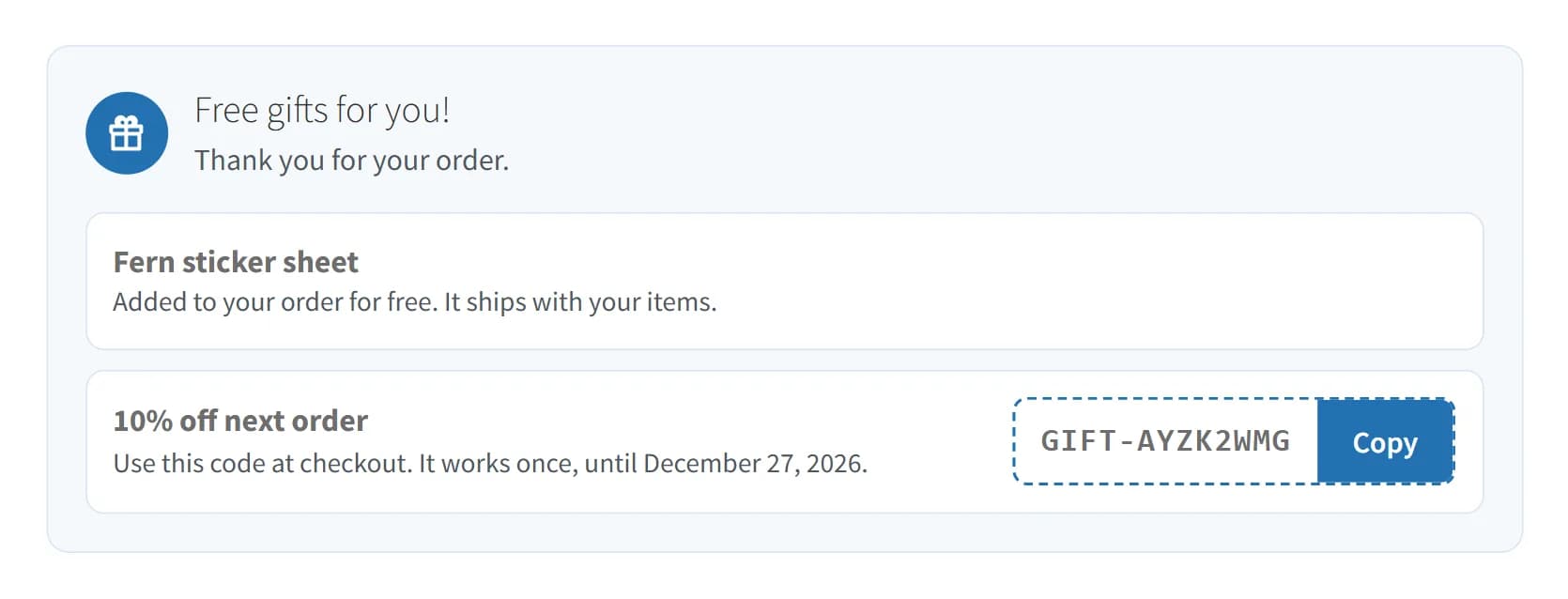
That's how Post-Purchase Gift, our plugin, works. It shows nothing in the cart or at checkout.
It waits until the order reaches Processing, which for most payment methods means it's paid. Then it decides the order's gifts once. An order that goes straight to Completed gets an order note instead of a product gift.
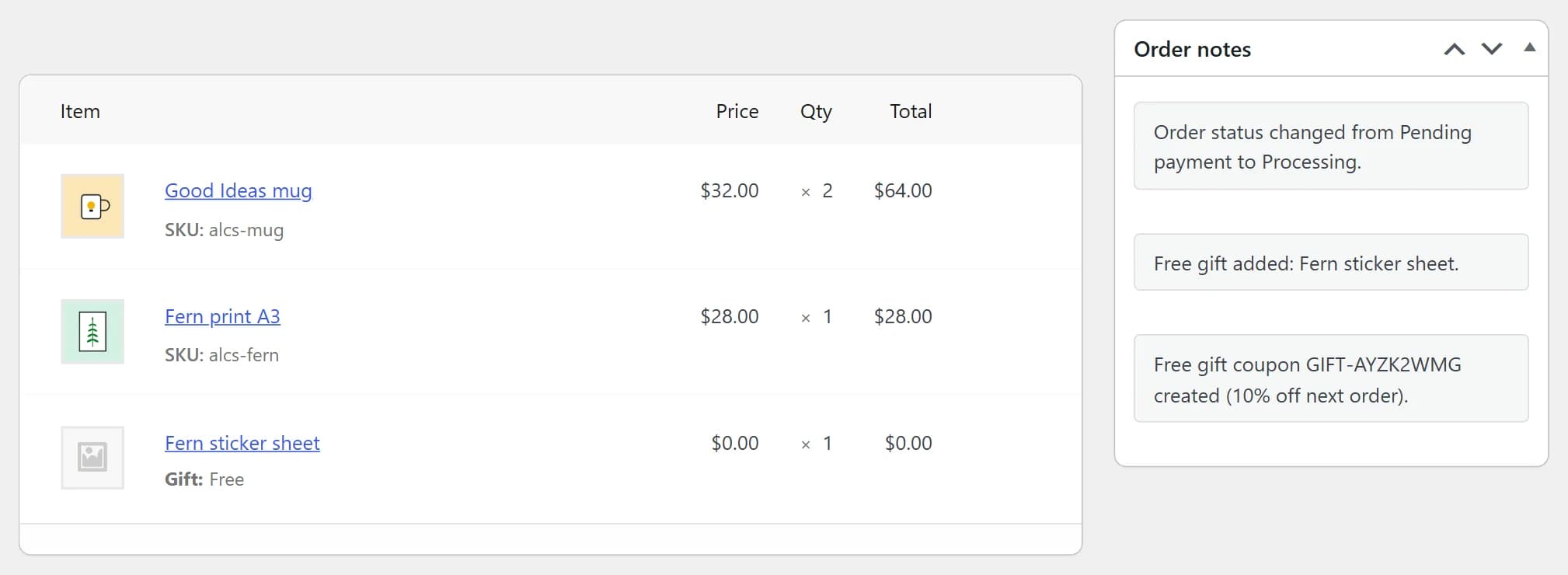
On Black Friday, Priya Shah pays for order #1043 at Good Ideas Studio. Her order reaches Processing, and a Fern sticker sheet joins it at $0.00. An order note says so.
Now take the three bugs from earlier:
- The gift that stays can't happen. The order is final when the gift is checked. The plugin counts the products after discounts, without shipping, and adds tax only if your cart shows prices with tax.
- The charged gift can't happen either. The gift line is added at $0.00 to an order that's already placed, so it can't change what the customer pays.
- A sold-out gift is skipped, and the order gets a note that says so. The customer was never promised it, so no one is let down.
The gift is always one item, and each order gets each gift once. Setting one up starts in Gifts > Add New, and our Black Friday thank-you gift guide shows each screen.
One thing to test: WooCommerce's Order again button copies an old order's items into the cart, and that can include the free gift. On a Completed test order that got its gift, click Order again and check the cart.
Cash on delivery orders work a little differently. They reach Processing before the customer pays, so the product gift goes in then, and a coupon gift waits until you mark the order Completed. Our post on free gifts on cash on delivery orders explains why.
One gap to know about: if you refund part of an order, the gift stays with it. The plugin removes an unused gift coupon only when the whole order is Cancelled or Refunded.
When is a cart gift the better choice?
When you want the gift to make today's order bigger, a cart rule is the right tool.
A shopper who sees "Spend $50.00 or more, get a free mug" may add a print to reach it. A gift after payment is a surprise, so it can't change what goes in the cart.
| What you want | The right tool |
|---|---|
| Bigger carts today, with a "Spend $50.00" message in the cart | A cart gift plugin |
| Customers who choose their own gift, or its color | A cart gift plugin |
| More gifts for bigger orders, like one per item | A cart gift plugin |
| A reason for customers to order again | A gift after payment |
| A gift that never touches the cart or checkout | A gift after payment |
Our plugin does none of the first three. If you need them, pick a cart gift plugin and run the five tests before you trust it with Black Friday.
Some stores use both: a cart rule to grow today's order, and a thank-you after payment for the next one.
What to do if your cart gift is broken now
Fix it or turn it off before the sale, not during it.
Run the five tests today. If one fails, write down the exact steps and send them to the plugin's author, so they can see the bug for themselves.
If there's no fix by Black Friday, turn the gift off and take the offer off your site. A sale with no gift is better than a gift you have to refund.
If you still want to thank your customers, give the gift after payment instead. Nothing is promised in the cart, so a change to the cart can't take the gift away or put a price on it.
Questions store owners ask
What should I do if a customer was charged for a free gift?
Refund the gift's price and say sorry in one short line. In WooCommerce > Orders, open the order, click Refund and refund only the gift's line. Then run the five tests to find the cause before more orders come in.
How do I know if my store uses the block checkout?
Go to WooCommerce > Settings > Advanced and see which page is set as Checkout page. Open that page in the editor. If it holds a Checkout block, you use the block checkout. If it holds the [woocommerce_checkout] shortcode, you use the classic one.
My theme has its own free gift option. Is that safer?
Not by itself. A theme's gift option still works in the cart, so it can have the same bugs, and owners have reported a theme charging for the gift at checkout. Run the same five tests on it.
Can I use a cart gift plugin and a gift after payment together?
Yes. Post-Purchase Gift doesn't change the cart, so your cart gift works as before. An order gets every gift it matches, so a customer could get both. Place one test order to see what they'll get.
Sources
We make Post-Purchase Gift, the plugin in this post.