
Thank every order
Put a sticker sheet in every parcel. It costs you little, and every customer opens a small surprise.
In the pluginEvery order
After checkout, Post-Purchase Gift adds a free product to the parcel or gives the customer a coupon for their next order. They find it in their order email and on the thank you page. You set the limits, so each gift costs what you planned.
30 days free, no card needed
Most gift plugins work in the cart, and a cart keeps changing until the customer pays. Here's what each kind of gift goes through.
Again every time the cart changes
Every change to the cart is a new chance to go wrong
Once, with nothing in the cart to break
Order notes on #1043
Your cart and checkout stay exactly as they are
Each of these is one gift you can set up in a minute. Mix them if you like: an order gets every gift it matches.
Put a sticker sheet in every parcel. It costs you little, and every customer opens a small surprise.
In the pluginEvery order
Buy a laptop, get a free mouse. Pick the products or categories that bring the gift. A category includes its sub-categories.
In the pluginWhen they buy certain products
Orders of $50.00 or more get a gift. Smaller orders don't get one, so the gift stays worth it.
In the pluginWhen they spend a set amount
Give first-time customers 10% off their next order, so their first order isn't their last.
In the pluginHow often: A customer's first order only
Go to Gifts > Add New and answer one question: “When should customers get a gift?” Pick an answer, choose what they get, and click Save gift. Before you save, a What happens box tells you in plain words what the gift will do.
Gifts > Add New
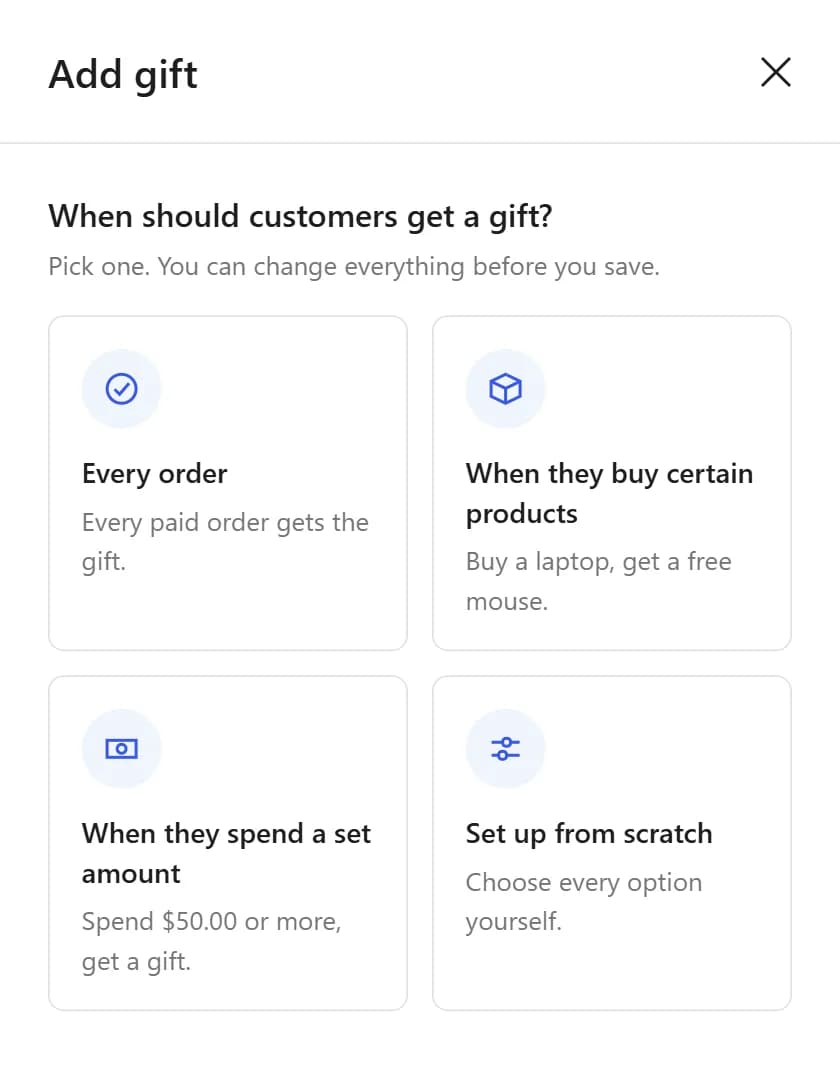
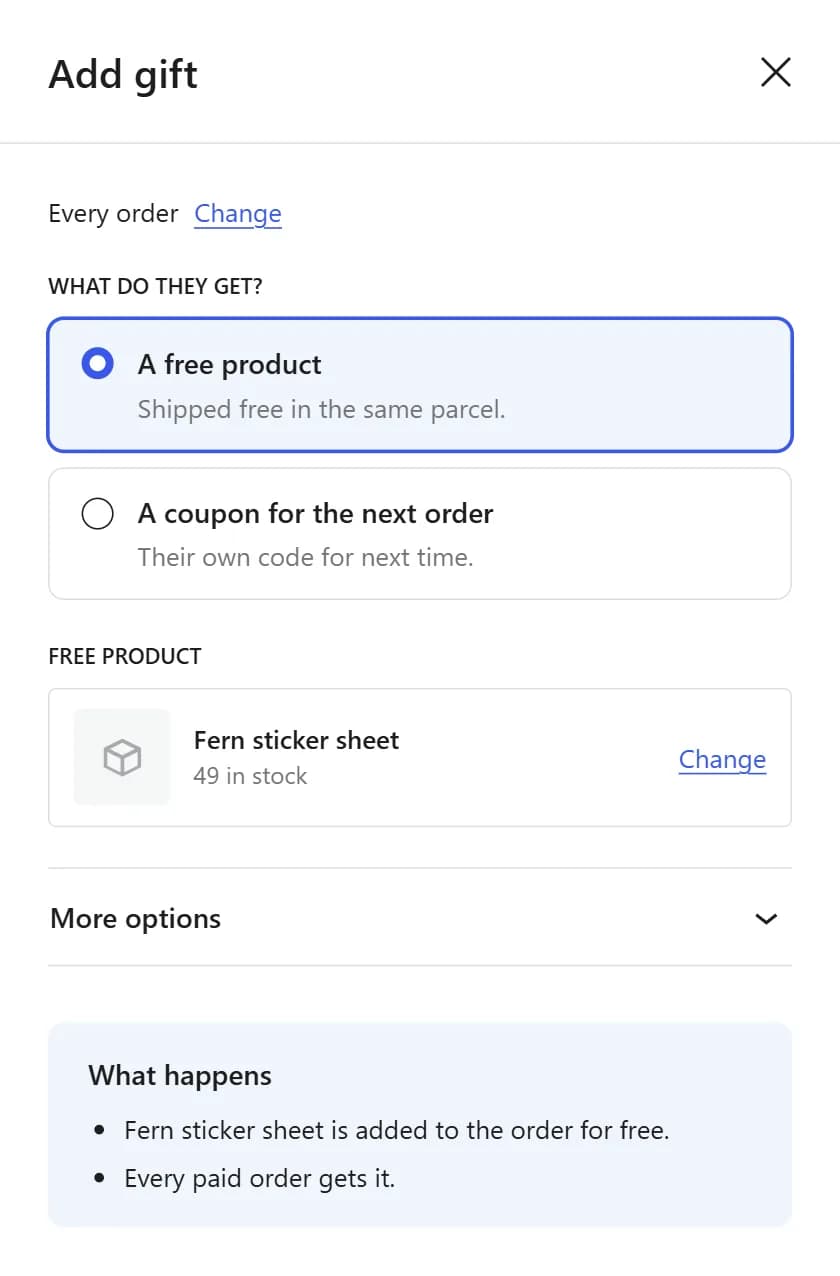
A product gift is added to the order at $0.00 and ships in the same parcel. It shows as “Gift: Free”, so your team knows to pack it. A coupon gift gives the customer their own code for the next order, as a percentage or a fixed amount off.
Gifts > Add New, What do they get?
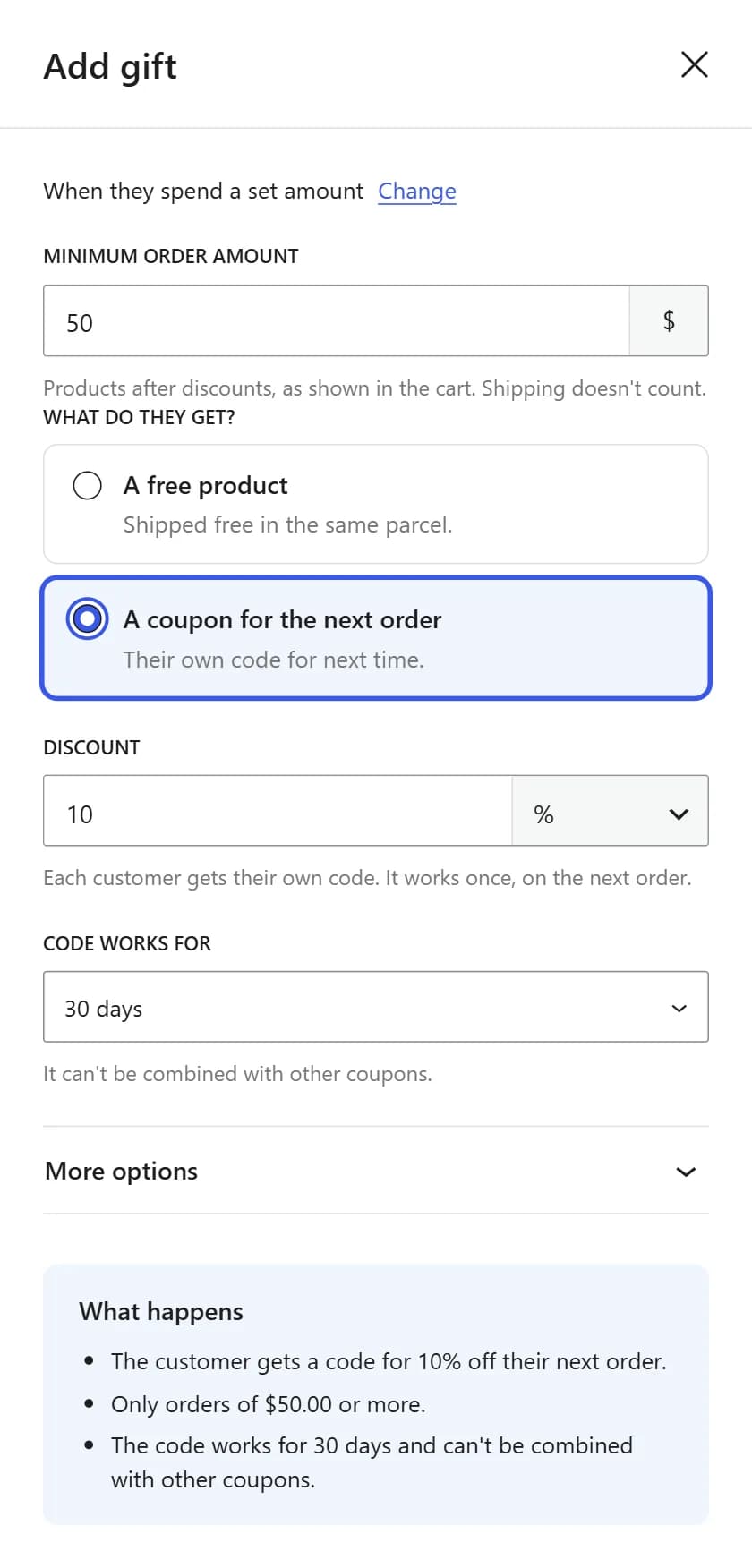
Set a Minimum order amount, so small orders don't get the gift. It counts the products after discounts, as shown in the cart, and shipping doesn't count. Then choose How often: every order, a customer's first order only, or once per customer.
Gifts > Add New, More options
WooCommerce marks a cash on delivery order Processing before the customer has paid. So a product gift goes in the parcel, and comes back with it if the parcel is refused. A coupon gift waits until you mark the order Completed, after the money is in.
WooCommerce > Orders, in the order notes
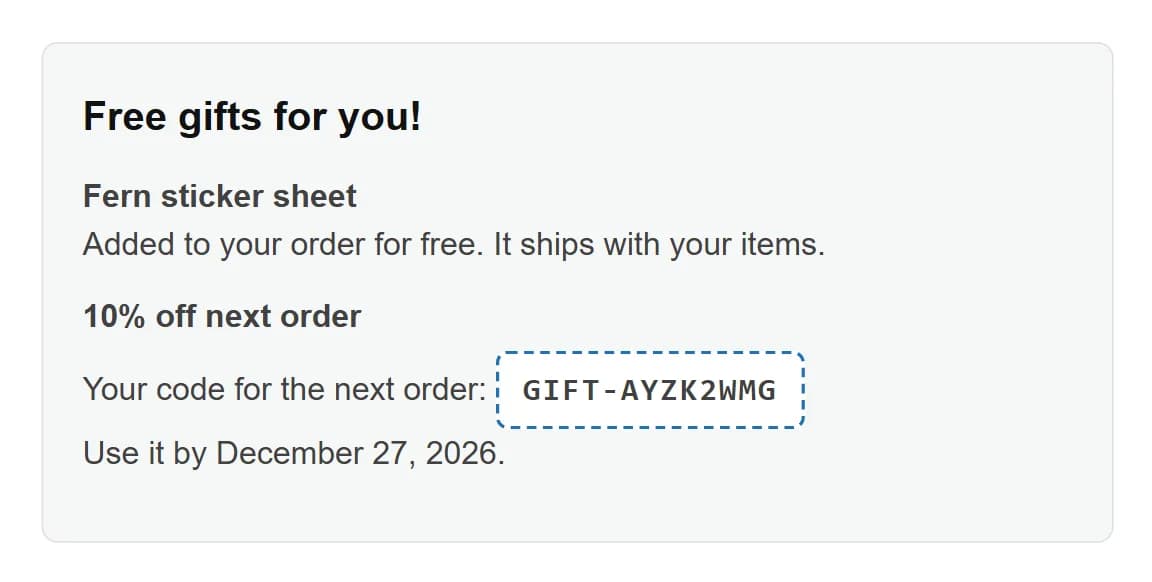
Every customer finds the gift in the order email and on the order's page in My Account, so the code is easy to find later. Customers also see a “Free gifts for you!” box on the thank you page, with a Copy button for each code. With cash on delivery, the coupon appears once you mark the order Completed.
Thank you page, order emails and My Account
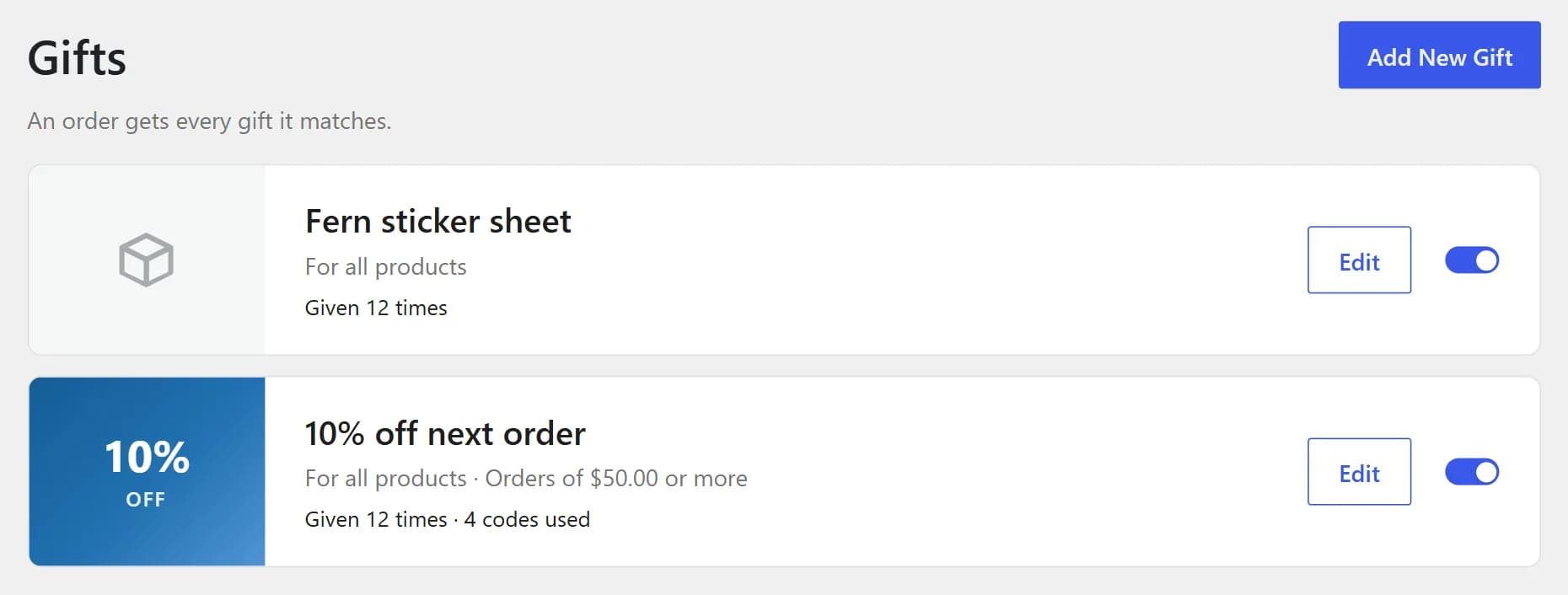
The Gifts list shows each gift's rules and how many times it was given. For a coupon gift, it also shows how many codes were used, so you can see customers coming back.
Gifts > All Gifts
Works with WooCommerce's High-Performance Order Storage.
It never touches the cart or checkout, so the blocks and the classic checkout work as before.
The gift box shows on block themes and classic themes. Developers can copy its template into the theme to change it.
Every word the plugin shows, to you and to your customers, can be translated.
An order that changes status again never gets the same gift twice.
A product gift that's out of stock is skipped, and the order gets a note that says why.
When an order becomes Cancelled or Refunded, its unused gift coupons are removed. If it's cancelled, WooCommerce puts the gift product back in stock.
A partial refund doesn't change the order's status, so the gift stays. Asking for it back is up to your store's policy.
WooCommerce stores give gifts in three common ways. Each one fits a different goal, so here's what each one does and when to pick it.
A gift rule in the cart
A coupon sent after the order
You add the gift yourself
This plugin
These are kinds of tools, not products. Each tool works its own way, so check the details of any one you consider.
Try it free for 30 days, no card needed. If a paid yearly plan ends, the plugin keeps working on all your sites. You only stop getting updates and support.
Free for 30 days this Black Friday
Try it free for 30 days with no card, and have your gift running for the Black Friday and Cyber Monday sales.
$29a year
Renews each year. Cancel any time.
30 days free, no card needed
$79once
Pay once and keep it for good.
After checkout, or when your trial starts, we email you what you need to install it. In WordPress, go to Plugins > Add Plugin (older WordPress versions call it Add New Plugin) > Upload Plugin, choose the zip file and activate it.
Still not sure it fits your store? Email [email protected] and a real person will get back to you.
Yes. Start the 30-day trial before the sale and set up your gift. It goes out on every matching order through Black Friday on November 27 and Cyber Monday on November 30, 2026. No card needed.
It keeps going out on new orders that match it. Coupons waiting for cash on delivery orders still arrive when you mark those orders Completed. After the trial, you need a license to change, switch off, add or delete a gift. If you only want it for the sale, switch it off before the trial ends.
No. Nothing shows in the cart or at checkout. The gift comes after checkout: a product gift when the order reaches Processing, and a coupon when it reaches Processing or Completed (on cash on delivery orders, only at Completed, after the customer pays). So it can't break your checkout, but it also can't make this order bigger. Its job is to bring the customer back.
A product from your store, or a coupon for the next order. A product gift is added to the order at $0.00 and ships in the same parcel. It can be a simple product or one variation, even one hidden from your shop. A coupon gift takes a percentage or a fixed amount off.
Yes. An order gets every gift it matches. With a sticker sheet for every order and a coupon for orders of $50.00 or more, Priya's $182.00 order gets both. There's no setting for one gift per order, so use Minimum order amount and How often to keep the cost down.
Yes. A product gift is added when the order reaches Processing, so it ships in the parcel. If the parcel is refused, the gift comes back with it. A coupon gift waits until you mark the order Completed, after the customer has paid.
No. Gifts have no start or end date. Turn the gift on before the sale with the switch on its row in Gifts > All Gifts. Turn it off only after the sale's orders are paid, and its cash on delivery orders are marked Completed. A gift that's off isn't given, not even a coupon still waiting for a cash on delivery payment. Once a free trial has ended, switching a gift off needs a license.
Yes. It never changes the cart or checkout, so the Cart and Checkout blocks and the classic checkout work as before. The gift box shows on block themes and classic themes. It also supports High-Performance Order Storage (HPOS).
Yes. The yearly plan has a 30-day free trial with every feature. Click Start free trial and enter your email. We email you what you need to install it, so you can set up your first gift the same day.
No. You only give your email address. Nothing is charged, and the trial doesn't turn into a paid plan by itself. Buy the yearly or lifetime plan when you're ready.
If you haven't bought a license, the Gifts screen asks for one. Gifts you already set up still go out on new orders, so customers keep getting them. To change, switch off, add or delete a gift, you need a license. Buy one and activate it. Nothing you set up is lost.
The plugin keeps working on all your sites. Only updates and support stop, unless you renew the yearly plan.
Plain guides on thank-you gifts, safe coupons and bringing customers back.
Most of them don't order again. Here's what brings them back, and what to do this week.
Eight steps with real screens, from install to the day you turn it off.
Old codes that never end and stack at checkout cost more than they look. Fix them today, then thank customers with a code that can't.
Try it free for 30 days with no card, and have your gift running for the Black Friday and Cyber Monday sales.