Are your coupons eating your profit? How to give a thank-you coupon that's safe
Old codes that never end and stack at checkout cost more than they look. Fix them today, then thank customers with a code that can't.
By the Autora Lab team · Updated November 17, 2026 · 6 min read
Short answer
Say it's a quiet Tuesday in March. You open a new order for $92.00: two Good Ideas mugs and a Fern print A3. Below the items are three coupon codes. SPRING10 is from a spring sale, WELCOME10 from an old welcome email, and the third is a $10.00 code you once posted online.
All three still work, and WooCommerce let the customer use them together. That's $28.40 off one order. This is how too many coupons with no expiry date eat your profit: quietly, one order at a time.
You can fix it today in Marketing > Coupons. Three rules do most of the work: every code ends, no code stacks, and no code makes another. The same rules give you a thank-you coupon that's safe.
How do coupons eat your profit?
Each code takes its share from the same profit, and WooCommerce lets the shares add up. This is the $92.00 order from above, one code at a time.
Those numbers are an example. A post on Reddit's r/woocommerce on November 12, 2026 made the same point with a shop the poster made up: 400 coupons, and two thirds of them with no end date. In that shop, stacked codes cut the margin on an order from $31 to $6.90.
Margin is what you keep from a sale after the cost of the product. When it's thin, two or three old codes can take nearly all of it.
Why should every coupon have an end date?
Because a code with no end date gives no reason to use it soon, and it keeps working long after you've forgotten it.
WooCommerce leaves the Coupon expiry date field empty on every new coupon. So a code you made for one weekend sale works for years, unless you fill it in.
A deadline also gets people to act. In 2010, researchers Suzanne Shu and Ayelet Gneezy gave people vouchers for cake and a drink at a French cafe, as The National reported that year. Some vouchers worked for three weeks, and some for two months.
The people with two months thought they had the better deal. Yet more of the three-week group used theirs.
Coupons work the same way. "Use it by December 27" gives a date to plan around, while "use it any time" is easy to put off. For a thank-you code, a few weeks is enough: long enough to need something again, short enough to remember.
How do you stop coupon stacking in WooCommerce?
Check "Individual use only" on the coupon's Usage restriction tab. Then the code can't be used with any other coupon.
WooCommerce handles it both ways. If the customer adds this code to a cart that already has codes, it takes the others off. If this code is in the cart first, any code added after it is refused.
Turn it on for every code you give out, not only the big ones. Two codes without it can still be stacked on the same order.
It doesn't cover sale prices, though. A 10% code on a print that's already on sale is a second discount. For codes you'll use during a sale, also check "Exclude sale items", so the code doesn't apply to items on sale.
What is a coupon loop?
A coupon loop is when an order paid with a thank-you coupon earns another thank-you coupon, and that one earns another.
Picture Priya. She gets 10% off her next order as a thank-you for order #1043. She uses it, and that order earns her a new 10% code.
So does the one after it. Your one-time thank-you has become 10% off everything she buys, forever.
WooCommerce doesn't make coupons after an order by itself, so a loop comes from a tool that does. Test any tool like that before a sale: place an order with one of its codes, and see if a new code arrives. If one does, look for a setting that skips orders paid with its own codes.
How to fix the coupons you already have
Go through Marketing > Coupons one code at a time. Trash what you don't need, and give the rest an end date and limits.
WooCommerce can't change these settings on many coupons at once, so you'll open each one. Begin with big discounts and codes that were shared in public.
Find the codes that never end
Go to Marketing > Coupons. In the Expiry date column, a dash means the code never ends. In the Usage / Limit column, the ∞ sign means there's no limit on its total uses.
Trash the ones you don't need
Hover over the code and click Trash. WooCommerce only takes codes that are published, so a code in the trash stops working right away.
Add an end date
Open each code you keep. On the General tab, fill in Coupon expiry date. The code stops working at 00:00 on that date, so pick the day after its last day.
Stop stacking
On the Usage restriction tab, check Individual use only. For a code you'll use during a sale, also check Exclude sale items.
Limit the uses
On the Usage limits tab, set Usage limit per coupon to the most uses you'll allow, and Usage limit per user to 1. For a code meant for one person, put their email in Allowed emails, on the Usage restriction tab.
Update and test
Click Update. Then put the code in your own cart together with another code. Only one of them should stay.
Only have ten minutes today? Fix the biggest discount that never ends.
What makes a thank-you coupon safe?
Five settings make it safe: an end date, one email, one use per code, one use per person, and no stacking. Copy them from this table:
| Setting | Tab | Safe value |
|---|---|---|
| Coupon expiry date | General | A few weeks after the order |
| Individual use only | Usage restriction | Checked |
| Allowed emails | Usage restriction | The customer's email |
| Usage limit per coupon | Usage limits | 1 |
| Usage limit per user | Usage limits | 1 |
That's five settings for every customer. With a few orders a week, you can make each code by hand. On Black Friday, nobody at the packing table has time for it.
Can a plugin make these coupons for you?
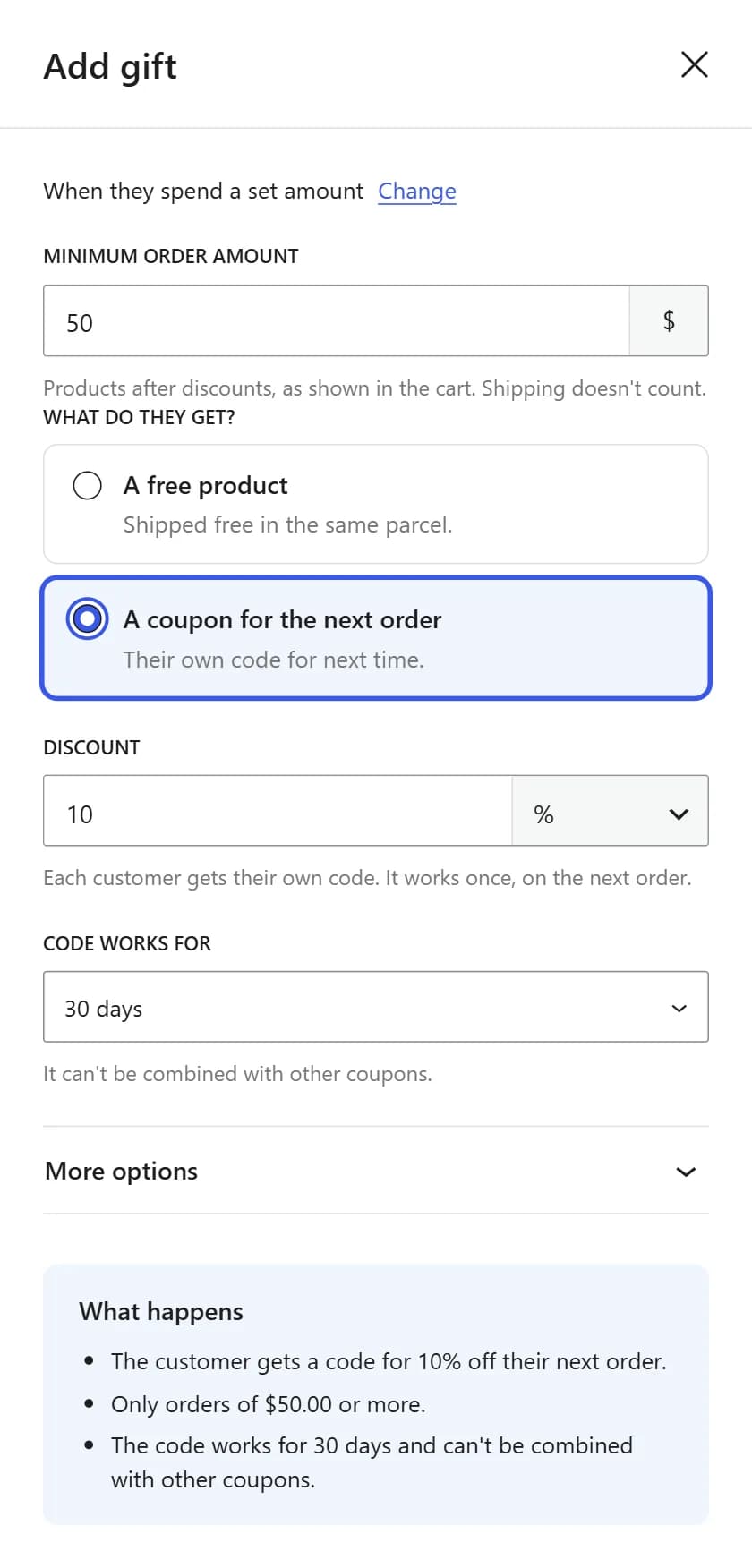
Yes. Post-Purchase Gift makes a new code after each paid order, with every setting from the table already in place.
- It works once. Usage limit per coupon and Usage limit per user are both 1.
- It's only for that customer. Their billing email goes in Allowed emails.
- It can't be stacked. Individual use only is checked.
- It ends. "Code works for" is 30 days unless you pick 14, 60 or 90 days. The code works until the end of its last day, in your store's time zone.
- It can't loop. An order paid with a gift code doesn't earn a new one, and the order gets a note that says why.
Each code looks like GIFT-AYZK2WMG and sits in Marketing > Coupons with a description such as "Free gift for order #1043". Priya sees her end date too: her order email says "Use it by December 27, 2026." If the order is set to Cancelled or Refunded before she uses it, the plugin moves the code to the trash.
It won't fix the coupons you already have, so the steps above still matter. It sends no reminder before a code ends, and a partial refund leaves the code in place. And if you pick "No end date", you're back where this post began.
An order gets every gift it matches, so two coupon gifts mean two codes. On cash on delivery orders, the code waits until you mark the order Completed, for reasons our cash on delivery post covers.
To keep small orders from getting a code, add a Minimum order amount. How much a customer should spend helps you pick it, and the Black Friday thank-you gift guide shows the setup, screen by screen.
Questions store owners ask
What happens when someone tries a code after its end date?
WooCommerce won't apply it. The customer sees a message that the coupon has expired, and the order total doesn't change. Orders placed before the end date keep their discount.
Can I give a customer more time on their code?
Yes. Open the code in Marketing > Coupons, change Coupon expiry date and click Update. Gift codes from Post-Purchase Gift are normal WooCommerce coupons, so you can change their dates the same way. Tell the customer, because the thank you box, the email and My Account still show the old end date.
Should I delete coupons that have already ended?
You don't have to. An ended coupon stays in Marketing > Coupons, but nobody can use it. If the list gets too long to read, move old codes to the trash. Orders that used them still show the code.
Do gift codes work on items that are on sale?
Yes. Post-Purchase Gift doesn't check Exclude sale items, so a 10% gift code also takes 10% off sale prices. To change that for one code, open it in Marketing > Coupons and check the box.
Sources
We make Post-Purchase Gift, the plugin in this post.