How much should a customer spend to get a free gift?
A simple way to pick your number from your own orders, and what counts toward it.
By the Autora Lab team · Updated November 17, 2026 · 7 min read
Short answer
Two Black Friday orders sit side by side in WooCommerce > Orders: Priya Shah's #1043 for $182.00, and, say, a single $5.00 postcard.
With no free gift minimum spend, both get the same Fern sticker sheet. On Priya's order, the sheet is a small thank-you. On the postcard, it can take most of what you made.
A minimum spend fixes that. You can pick yours in ten minutes, with numbers you already have.
Why set a minimum spend for a free gift?
Because the gift costs the same on a $5.00 order as on a $500.00 one. The small order can't pay for it.
A product gift costs you every time: the item, the packing and a little extra weight in the parcel. The customer paid for shipping before the gift was added, so that extra weight is yours to pay.
A minimum keeps the gift for orders that can carry it. Smaller orders go through as normal. They just don't get the gift.
How to set a free gift threshold from your own numbers
Find the smallest order where the gift is only a small part of your profit. Then check that number against your typical order.
You need three numbers:
- Your typical order. In WordPress, go to Analytics > Orders and read the Average order value for a few normal months. It leaves out tax and shipping. If your cart shows prices with tax, the plugin counts the tax, so your orders look a little bigger to it than this number.
- Your margin: the part of each sale you keep after paying for the product. If you're not sure of yours, the questions at the end show how to work it out.
- What the gift costs you: the item and its packing.
For example, say Good Ideas Studio keeps 50% of each sale, and its Fern sticker sheet costs $1.50 to print and pack. Here is how much of the profit the sheet takes on orders of different sizes.
| Order | You keep (50%) | The $1.50 sheet takes |
|---|---|---|
| $5.00, a postcard | $2.50 | 60% |
| $28.00, one Fern print | $14.00 | 11% |
| $50.00 | $25.00 | 6% |
| $96.00, order #1042 | $48.00 | 3% |
| $182.00, Priya's order | $91.00 | 2% |
On the postcard, the gift takes more than half the profit. On Priya's order, it's tiny.
Now decide how much of the profit a gift may take. We use 10% here as an example, so choose your own.
Then do the sum in two steps. First, the gift's cost times 10 is the profit the order must make: $1.50 × 10 = $15.00. Then divide that by your margin as a decimal (50% is 0.5): $15.00 ÷ 0.5 = $30.00.
So for this gift, any minimum from $30.00 up is safe. At a 40% margin, it would be $37.50.
A coupon for the next order works differently. It costs you nothing today, only when the customer comes back and uses it on a new order. So a coupon can have a lower minimum than a product.
Give a percentage, like 10%, rather than a fixed amount. A code for $10.00 off could make a $10.00 next order free, apart from shipping.
Should the minimum be higher than your typical order?
No. For a surprise gift, set it at or below your typical order, so most customers still get it.
A usual gift with purchase threshold works the other way. The cart says "Spend $50.00, get a free tote", and customers add an item to reach it. That's why a cart offer can set the bar above the typical order.
A thank-you gift after checkout can't do that. Nobody knows about it before they pay, so a high minimum doesn't make anyone spend more. It only means fewer people get thanked.
Say Good Ideas Studio's typical order is $70.00, for example. Its sticker sheet is safe from $30.00, so any number between the two works. It picks $50.00, a round number in the middle.
One Fern print at $28.00 doesn't get the gift. A print with a mug, at $60.00, does.
If your safe number is above your typical order, the gift is too big for most orders. A Good Ideas mug that costs $12.00 to make, for example, needs a $240.00 order at a 50% margin.
So pick a smaller gift. Our list of free gift ideas has small ones that cost little.
What counts in the order amount?
The products the customer paid for, after discounts. Post-Purchase Gift checks the amount once, when the order first reaches Processing or Completed.
- Counted: each product in the order, at the price the customer paid after sale prices and coupons.
- Left out: gift items. A gift added to the order never counts toward another gift.
- Left out: shipping, and fees added at checkout, like a gift wrap fee.
- Tax: counted only if your cart shows prices with tax. More on that below.
Take this cart, for example: two Good Ideas mugs at $32.00, a Fern print A3 at $28.00, and the SPRING10 coupon taking $9.20 off. The plugin counts $82.80, whatever the shipping costs.
An order of exactly $50.00 gets the gift, because the rule is "or more".
If you later refund part of an order, the gift stays, even if the order drops under your minimum. That's a store policy matter, and our post on free gift rules covers it.
Should tax count toward a free gift minimum?
Only if your shop shows prices with tax. The plugin counts the amount the way your cart shows it.
WooCommerce sets this in WooCommerce > Settings > Tax, under "Display prices during cart and checkout". With "Including tax", the plugin adds the tax to the amount. With "Excluding tax", it leaves tax out.
No Tax tab there? Then tax is turned off in your store, and there's no tax to count.
This matters because you think in the prices your shop shows. If your cart shows $54.00 for products that cost $45.00 before tax, for example, you'd call it a $54.00 order. So does the plugin, and a $50.00 minimum gives it the gift.
Other gift tools may count it differently. If you ever switch, check whether the new one counts tax.
Why doesn't shipping count?
Because shipping isn't something the customer bought from you. That money goes to the carrier.
If shipping counted, a customer far away would reach your minimum with fewer items than a customer in your own town. The gift should follow what people buy, not where they live.
How else can you keep the cost down?
Choose who gets the gift. Open "More options" and set "How often" to "A customer's first order only" or "Once per customer".
- "A customer's first order only" gives the gift only to customers with no earlier paid order. The plugin looks for a Processing or Completed order with the same email address or customer account.
- "Once per customer" lets everyone get the gift, but one time. A customer who got this gift on an earlier paid order doesn't get it again.
Say Priya first ordered from you in the spring. With first order only, her Black Friday order doesn't get this gift.
With once per customer, her Black Friday order gets the gift, and her December order doesn't.
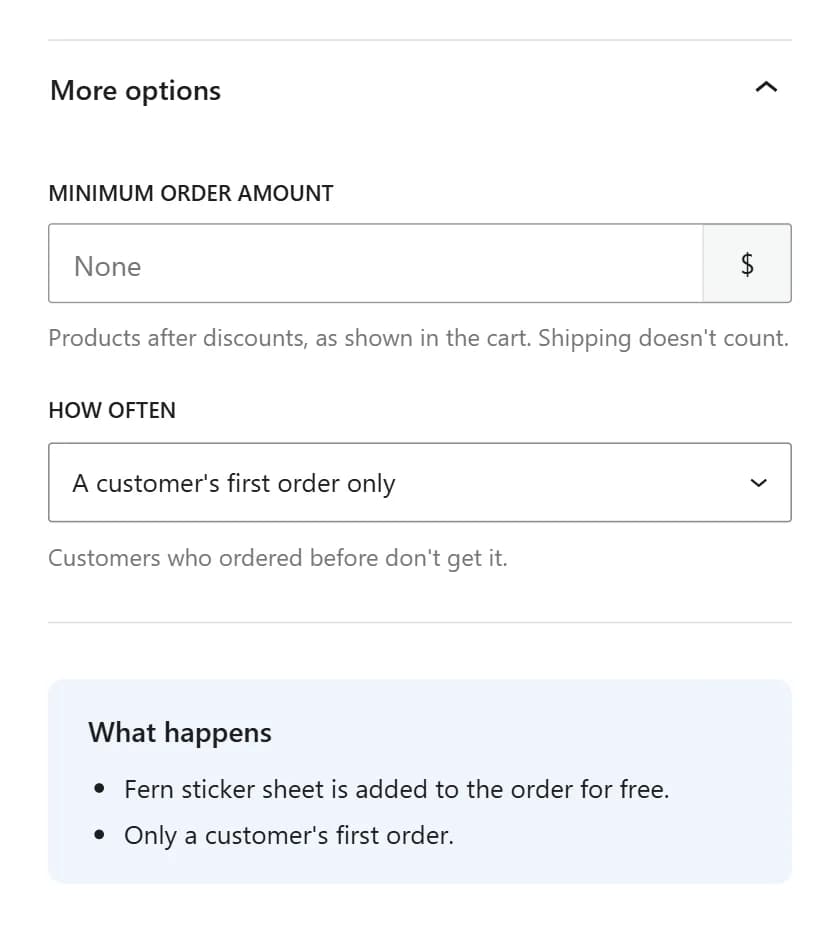
How often works together with the minimum. An order must reach $50.00 and pass How often to get the gift.
For Black Friday, first order only is the cheaper choice, and it goes to new customers, who come back less often than regulars. Our post on keeping Black Friday customers has the numbers.
Once per customer fits a store with many regulars you want to thank as well, just not every time.
Where do you set the minimum?
In Gifts > Add New. Pick "When they spend a set amount", then type your number in "Minimum order amount".
Type the number only, like 50. This card won't save without one.
The field's help text sums up this post: "Products after discounts, as shown in the cart. Shipping doesn't count."
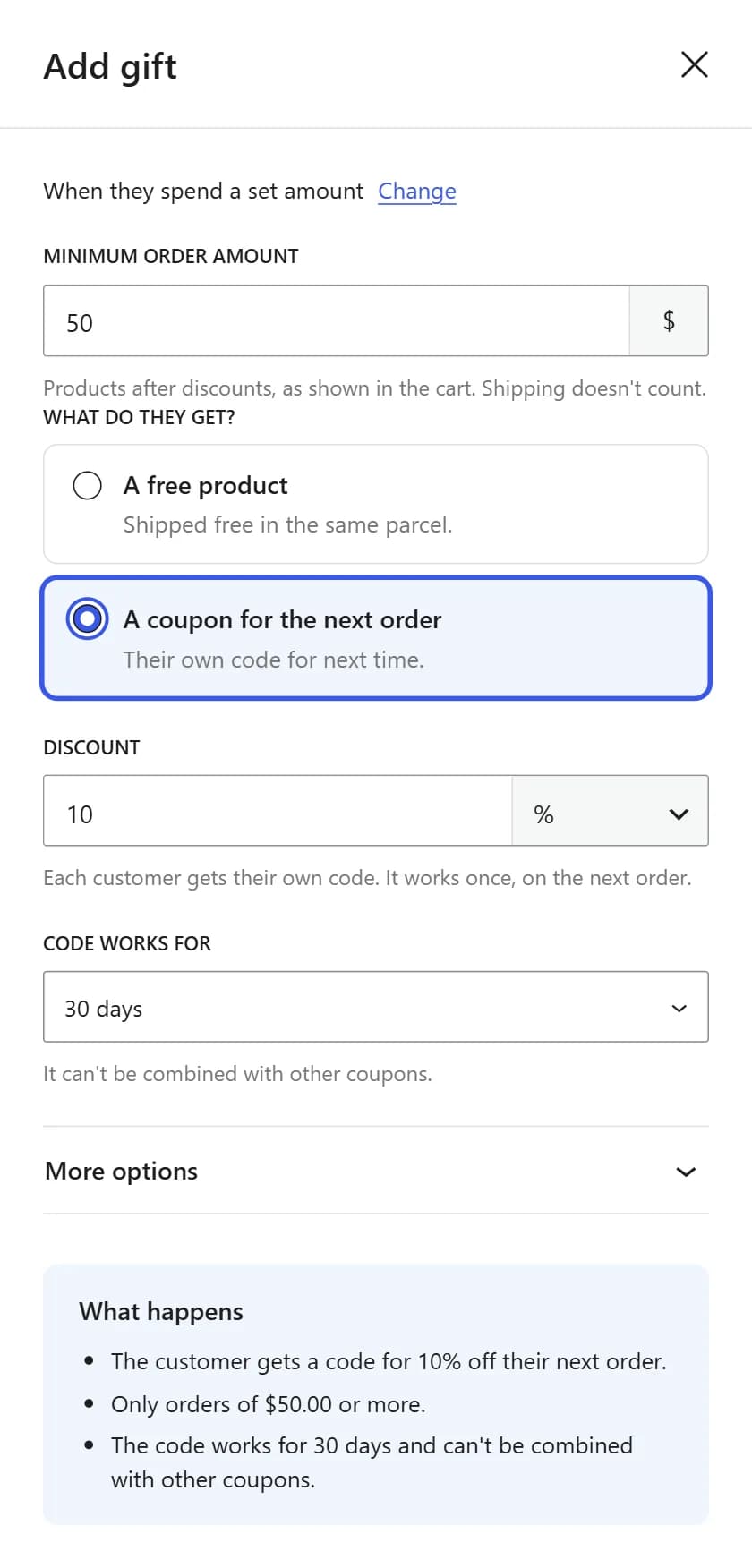
On the "Every order" and "When they buy certain products" cards, the field is under More options. For a gift you already saved, click Edit on its row in Gifts > All Gifts.
Before you click Save gift, read the What happens box. With a $50 minimum, it says "Only orders of $50.00 or more." Our Black Friday gift setup guide shows every other screen.
Before Black Friday: a quick check
- Read your Average order value in Analytics > Orders.
- Work out the smallest safe order for your gift, like the $30.00 in the example above.
- Set a round minimum between that number and your typical order.
- Look at WooCommerce > Settings > Tax, so you know whether tax counts.
- Place one test order just over the minimum and one just under. Only the first should get this gift. Then cancel both.
Questions store owners ask
Can I give a bigger gift for bigger orders?
Yes, with a second gift. For example, give the sticker sheet from $50.00 and a Good Ideas mug from $250.00. An order gets every gift it matches, so a $300.00 order gets both. There's no setting for one gift per order.
How do I work out my margin?
Take your best-selling product. Subtract what it costs you to make or buy from its price, then divide by the price. For example, a Fern print that sells for $28.00 and costs $14.00 has a 50% margin. If your margins differ a lot, use the lowest one.
Do customers under the minimum see anything?
No. The plugin shows nothing in the cart or at checkout, and an order without a gift gets no gift box on its thank you page or in its email. The order goes through as normal, and the customer never learns that a bigger order would have got a gift.
Does "first order only" work for guest checkouts?
Yes. The plugin looks for earlier paid orders with the same email address, as well as the same customer account. A guest who ordered before with a different email address looks new to it, so they get the gift.
We make Post-Purchase Gift, the plugin in this post.